
The Cal 1 Card has recently transitioned to an updated design and upgraded technology, so you may see different versions of the card being used by different community members (depending on when the card was issued). This means your card may look different, or may need to be used in a slightly different way.
Two designs

Right now, we have two designs for the Cal 1 Card. Both versions of the card are acceptable as a form of identification.
- Any card printed before July 1, 2021, shows the classic (yellow) design. This design is a functional valid campus photo ID at most locations, however may not work at some of our newer locations. Cardholders with the classic (yellow) design are eligible for a replacement card with the new design, and can now follow our instructions on how to replace a card to get their updated card.
- If your Cal 1 Card was printed on or after July 1, 2021, you have the new (blue) Cal 1 Card design on your valid campus ID card. All cards with the new design work at all places on campus.
Multiple ways to tap in
On the newer cards, two different functioning technologies are being used (i.e. an antenna and a chip) and the location of the technologies within the card has changed multiple times over the years. Accordingly, this requires different methods for “tapping in” due to the placement of its antenna/chip.
No matter which way you tap, please make sure to hold your card at least one inch away from card readers for a successful scan.
Cards with the classic (yellow) design
To gain access to a building or service, place the card flat on the reader.

Cards with the new (blue) design
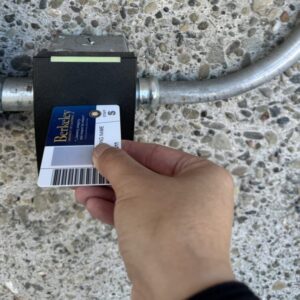
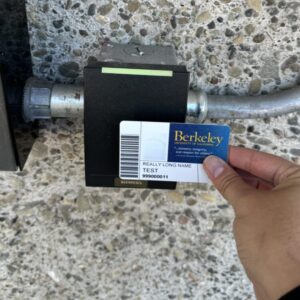
Cards with the new design may have the antenna and chip located in one of two places: either on the right-hand side of the card near the UC Berkeley seal or on the left-hand side of the card, near the photo and barcode. To gain access to a building or service, you can try the following options:
- Place the card on the card reader as if you were inserting it like a credit card (try both sides if one side doesn’t work)
- Place the card flat on the card reader (try both sides if one side doesn’t work)
Troubleshooting access issues
- If your Cal 1 Card is not working for access to residential housing locations, please report the problem to front desk staff at your building location and/or take your Cal 1 Card to the Cal 1 Card Office for further assistance.
- If your Cal 1 Card is not working for access to a campus building, please provide the specific building location(s) along with a photo of the front and back of your Cal 1 Card to fs-eaccesscontrol@berkeley.edu and/or take your Cal 1 Card to the Cal 1 Card Office for further assistance.
Proper care for your Cal 1 Card
Do not punch a hole in your Cal 1 Card.
Do not store your Cal 1 Card in your phone case – especially if you use a wireless charger.